

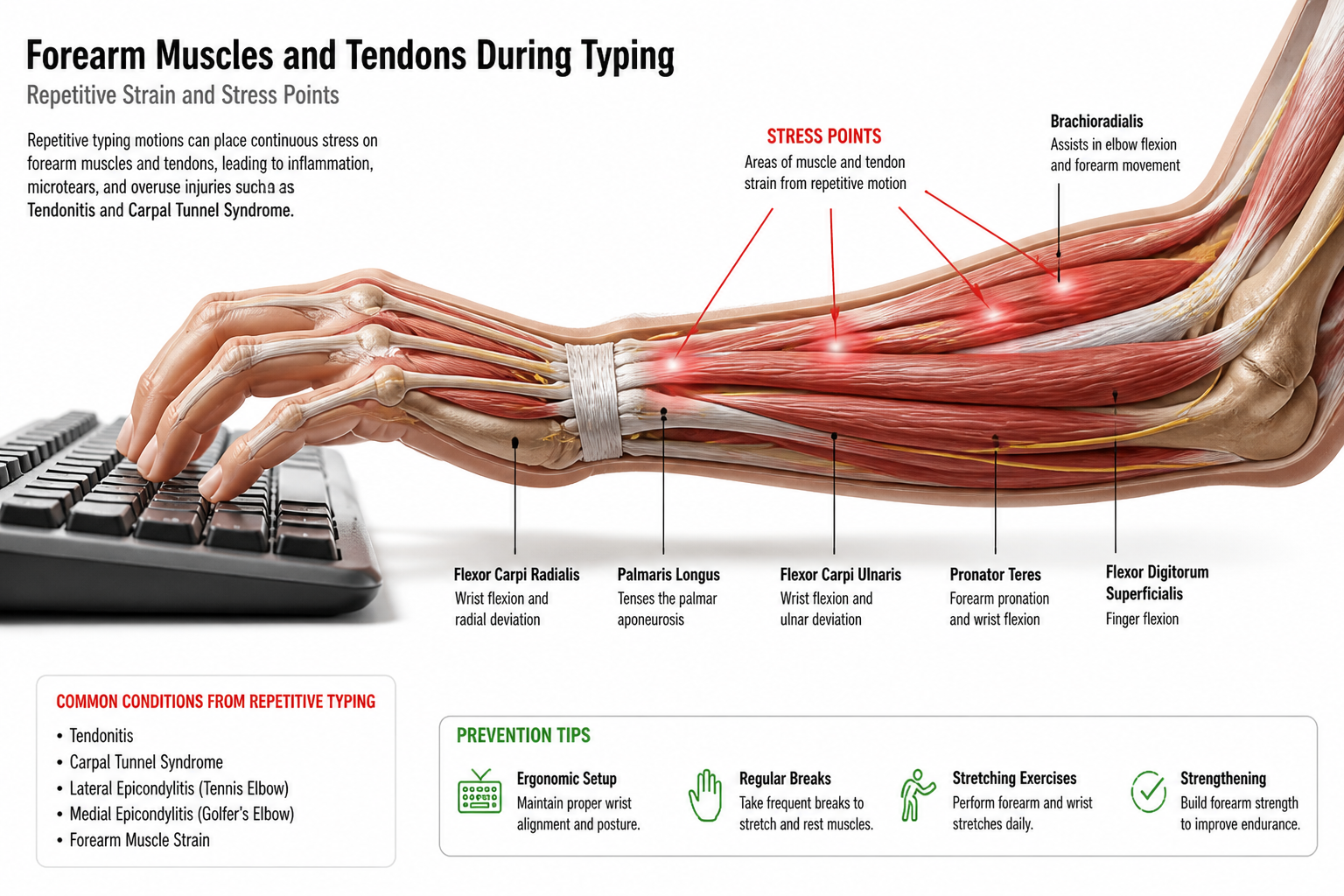
Over 86% of office workers spend their entire day typing, yet most don’t realize they’re developing repetitive strain injuries until the pain becomes unbearable. The modern workplace has created an epidemic of typing-related arm pain, affecting millions of professionals who depend on keyboards for their livelihood. An arm brace for typing pain has become an essential tool for maintaining comfort and productivity during long work sessions.
When typing discomfort strikes, it’s not just about the immediate pain—it’s about protecting your ability to work effectively and preventing long-term damage. Small strains that seem manageable today can develop into serious conditions that impact your career and daily life. Understanding how to choose and use the right support can make the difference between comfortable productivity and chronic discomfort.
This comprehensive guide explores everything you need to know about using an arm brace for typing pain, from understanding the root causes to selecting the perfect support for your specific needs.
Key Takeaways
• Typing pain develops gradually through repetitive motions and poor positioning, making early intervention crucial
• Arm braces provide targeted support by reducing strain on tendons and muscles during extended typing sessions
• Different brace types serve specific needs – compression sleeves for general support, elbow straps for localized pain
• Proper ergonomics combined with brace support delivers the most effective long-term pain relief
• Early action prevents serious injury – addressing minor discomfort now can prevent major problems later
Why Typing Causes Arm Pain
The human arm wasn’t designed for the repetitive, sustained motions that modern typing demands. When you type for hours each day, several factors combine to create the perfect storm for arm pain and injury.
Repetitive motion and overuse represent the primary culprits behind typing-related arm pain. Every keystroke requires coordinated movement from your fingers, wrists, forearms, and elbows. Multiply this by thousands of keystrokes per hour, and you’re asking your muscles and tendons to perform the same motions repeatedly without adequate rest.
Poor wrist and elbow positioning amplifies the strain significantly. Many workstations force users into awkward positions—wrists bent upward, elbows flared out, or forearms unsupported. These unnatural positions place additional stress on already overworked tissues.
The lack of breaks during long sessions prevents muscles from recovering between periods of activity. Without regular rest intervals, inflammatory compounds build up in the tissues, leading to pain and stiffness. Most people type continuously for hours without realizing the cumulative damage occurring.
Tension in the forearm muscles develops as a protective response to repetitive stress. This chronic tension restricts blood flow and creates trigger points that can refer pain throughout the arm and into the shoulder.
Common Issues That Develop
Several specific conditions commonly arise from prolonged typing:
Repetitive Strain Injury (RSI) encompasses a range of conditions caused by repetitive motions. RSI can affect muscles, tendons, and nerves throughout the arm, creating pain that ranges from mild discomfort to debilitating agony.
Tendonitis occurs when tendons become inflamed from overuse. Tennis elbow (lateral epicondylitis) and golfer’s elbow (medial epicondylitis) are common forms of tendonitis that affect typists, despite the misleading names.
Elbow and forearm discomfort often manifests as aching, burning, or sharp pain that worsens with continued typing. This discomfort can radiate up toward the shoulder or down toward the wrist and fingers.
Understanding these underlying causes helps explain why an arm brace for typing pain can be so effective—it addresses the mechanical factors that contribute to strain and overuse.
Can an Arm Brace Help With Typing Pain?
An arm brace for typing pain offers several mechanisms of relief that directly address the root causes of typing-related discomfort. The effectiveness comes from how these devices modify the biomechanics of typing while providing therapeutic benefits to stressed tissues.
Support during repetitive movement represents the primary benefit of wearing an arm brace while typing. The brace acts as an external support system, helping to distribute forces more evenly across the arm and reducing the load on specific muscles and tendons. This support is particularly valuable during long typing sessions when fatigue begins to compromise natural movement patterns.
Strain reduction on tendons and muscles occurs through compression and stabilization. A well-fitted brace applies gentle, consistent pressure that improves blood circulation while limiting excessive movement that could aggravate inflamed tissues. This compression also helps reduce swelling and promotes healing in damaged areas.
Better arm positioning becomes easier to maintain with brace support. Many arm braces include features that encourage proper alignment of the wrist, forearm, and elbow. This positioning reduces the awkward angles that contribute to strain and helps users develop better typing habits over time.
Improved comfort during long typing sessions allows users to maintain productivity without constant pain interruptions. The psychological benefit of knowing your arm is supported can also reduce tension and stress that often accompany chronic pain conditions.
Just like how knee braces provide targeted support for joint pain, arm braces offer specialized relief for the unique stresses of repetitive typing motions.
The key to success lies in selecting the right type of brace for your specific symptoms and using it as part of a comprehensive approach that includes proper ergonomics and regular breaks.
Types of Arm Braces for Typing Pain
Different styles of arm braces address various aspects of typing-related pain. Understanding the characteristics of each type helps you select the most appropriate support for your specific needs and comfort preferences.
Compression Sleeves
Lightweight and flexible compression sleeves slip over the forearm like a second skin. These sleeves provide graduated compression that’s tightest at the wrist and gradually loosens toward the elbow. The compression improves circulation, reduces swelling, and provides gentle support without restricting movement.
Ideal for long typing sessions, compression sleeves can be worn comfortably for hours without causing irritation or overheating. The breathable materials used in quality sleeves wick moisture away from the skin, preventing the clammy feeling that can develop during extended wear.
Compression sleeves work best for general forearm discomfort and mild to moderate pain. They’re particularly effective for users who experience aching or stiffness after long periods of typing but don’t have localized pain points.
Elbow Straps
Target localized tendon strain with focused pressure applied just below the elbow joint. These straps work by changing the angle at which forces are transmitted through the tendons, reducing stress on the attachment points where tendonitis commonly develops.
Useful for specific pain points, elbow straps excel at addressing tennis elbow and golfer’s elbow symptoms. The targeted compression interrupts the pain cycle while allowing normal movement of the wrist and fingers during typing.
Elbow straps are typically worn during activities that aggravate symptoms, making them perfect for typing sessions. They’re less bulky than full braces and can often be worn under clothing without being noticeable.
Wraparound Arm Braces
Adjustable support levels make wraparound braces versatile options for varying pain levels. These braces typically feature velcro closures that allow users to customize the amount of compression and support based on their current symptoms and activity level.
Suitable for moderate discomfort, wraparound braces provide more substantial support than compression sleeves while remaining comfortable enough for extended wear. Many include additional features like gel pads or metal stays for enhanced support.
The adjustability of wraparound braces makes them excellent choices for people whose pain levels fluctuate throughout the day or who need different levels of support for different activities.
Flexible Support Braces
Balance between comfort and stability defines flexible support braces. These devices incorporate elastic materials with strategic reinforcement in key areas. The result is a brace that moves naturally with your arm while providing meaningful support where it’s needed most.
Good for daily desk work, flexible support braces are designed specifically for office environments. They provide enough support to reduce strain without interfering with fine motor control needed for accurate typing.
Similar to how arm braces for all-day wear prioritize comfort during extended use, flexible support braces focus on maintaining productivity while managing pain.
What to Look for in the Best Arm Brace for Typing
Selecting an effective arm brace for typing pain requires careful consideration of several key factors. The best brace for your needs will balance support, comfort, and practicality for your specific work environment and pain patterns.
Comfortable for long hours should be the top priority when evaluating any arm brace. Look for soft, padded edges that won’t dig into your skin during extended wear. Seams should be flat or positioned away from pressure points. The brace should feel secure without creating hotspots or areas of excessive pressure.
Breathable materials prevent the buildup of heat and moisture that can make wearing a brace uncomfortable over time. Look for fabrics that incorporate moisture-wicking properties or mesh panels that promote airflow. Neoprene, while supportive, can trap heat and may not be ideal for all-day wear in warm environments.
Lightweight and flexible design ensures the brace won’t interfere with your typing accuracy or speed. Heavy, rigid braces can actually create new problems by forcing unnatural movement patterns. The ideal brace provides support while allowing the natural range of motion needed for effective typing.
Secure fit that doesn’t slip is essential for consistent support throughout your workday. A brace that slides around or loosens during use won’t provide reliable pain relief. Look for designs with multiple adjustment points or silicone strips that help maintain position.
Easy to adjust features allow you to modify the level of support as your symptoms change throughout the day. Some people need more support when they first start typing, while others require increased compression as fatigue sets in. Quick-adjust mechanisms let you customize support without removing the brace entirely.
Consider how the brace will integrate with your work environment. Will it fit under your clothing if needed? Can you easily put it on and remove it during breaks? Does it allow full access to your keyboard and mouse?
For those dealing with repetitive motion pain, these comfort and functionality factors become even more critical for long-term success.
How to Choose the Right Arm Brace
Making the right choice in arm brace selection requires a systematic evaluation of your specific symptoms, work demands, and personal preferences. The most expensive or heavily marketed brace isn’t necessarily the best choice for your situation.
Match brace type to severity of discomfort by honestly assessing your current pain level and functional limitations. Mild, general achiness may respond well to a simple compression sleeve, while sharp, localized pain might require the targeted support of an elbow strap or more substantial wraparound brace.
Consider the timing and triggers of your pain. Does it develop gradually throughout the day, or do you experience immediate discomfort when you start typing? Pain that builds over time often responds to compression and support, while immediate pain may indicate a more specific mechanical problem requiring targeted intervention.
Consider how long you’ll wear it when evaluating different options. If you need support for 8+ hours daily, prioritize comfort features like breathable materials and soft edges. For shorter periods of use, you might accept a less comfortable brace if it provides superior pain relief.
Prioritize comfort and flexibility especially if your work requires precision and speed. A brace that interferes with your typing accuracy or causes you to modify your technique significantly may create new problems while solving the original pain issue.
Ensure proper sizing by carefully measuring your arm according to the manufacturer’s guidelines. Most braces are sized based on forearm circumference measured at the widest point. A brace that’s too small will be uncomfortable and may restrict circulation, while one that’s too large won’t provide adequate support.
Don’t hesitate to try different styles if your first choice doesn’t provide the expected relief. What works for one person may not work for another, even with similar symptoms. Keep receipts and check return policies when trying new braces.
Just as choosing the right knee brace requires matching the device to specific needs, arm brace selection should be based on your individual pain pattern and work requirements.
How to Wear an Arm Brace While Typing
Proper application and positioning of your arm brace significantly impacts its effectiveness for typing pain relief. Even the best brace won’t provide optimal benefits if it’s worn incorrectly or positioned improperly.
Position correctly on the forearm or elbow according to the specific design of your brace. Compression sleeves typically extend from just above the wrist to mid-forearm, while elbow straps should be positioned 1-2 inches below the elbow joint. Wraparound braces may cover a larger area but should be centered on the point of maximum discomfort.
Take time to read the manufacturer’s instructions carefully. Many braces include anatomical diagrams showing proper placement. When in doubt, consult with a healthcare provider or physical therapist who can demonstrate correct positioning for your specific brace type.
Keep it snug but not tight to ensure effective support without compromising circulation. You should be able to slide one finger under the brace comfortably. If you notice numbness, tingling, or color changes in your fingers, the brace is too tight and should be loosened immediately.
Monitor your comfort level throughout the day. Some initial adjustment period is normal, but persistent discomfort or skin irritation indicates a fit problem that needs to be addressed.
Wear during extended typing sessions rather than all day if possible. Most typing-related arm pain develops during periods of sustained activity, so timing your brace use to coincide with these high-stress periods maximizes benefits while minimizing potential drawbacks of prolonged compression.
Adjust as needed throughout the day to maintain optimal support and comfort. Your arm may swell slightly during the day, requiring loosening of adjustable straps. Conversely, you may need to tighten the brace if it begins to slip or if your pain increases.
Remove the brace periodically to check your skin and allow normal circulation. Brief removal periods also help prevent skin irritation and allow you to assess whether the brace is providing the intended benefits.
For those using arm braces for long-term support, establishing a consistent wearing routine helps maximize therapeutic benefits while minimizing potential complications.
|

|

|
|
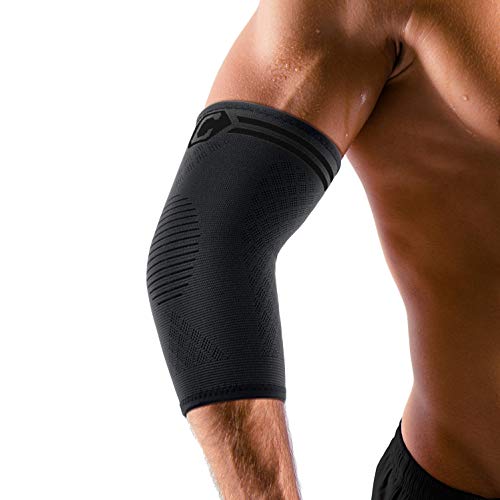
Description: TARGETED PAIN RELIEF & BOOSTED RECOVERY - Engineered with graduated compression, our elbow sleeves apply targeted support to key joint areas to help relieve discomfort associated with tennis elbow, tendonitis, and arthritis. |
Description: GOOD PERFORMANCE - The elbow brace applies even pressure to the elbow joint and elbow muscles, which can relieve tennis elbow, tendonitis, joint inflammation, golfer's elbow and other elbow pains, etc. |
Description: Our elbow brace is great for treating tendonitis, arthritis, sprained bones, strained ligaments, cubital Tunnel,ulnar nerve. Provides optimal support and compression to the elbow joint, reducing pain and preventing further injury during activities |
|
Our Rating:
4.8
|
Our Rating:
4.5
|
Our Rating:
4.4
|
|
$9.99
|
$9.99
|
$7.97
|
TARGETED PAIN RELIEF & BOOSTED RECOVERY - Engineered with graduated compression, our elbow sleeves apply targeted support to key joint areas to help relieve discomfort associated with tennis elbow, tendonitis, and arthritis.
GOOD PERFORMANCE - The elbow brace applies even pressure to the elbow joint and elbow muscles, which can relieve tennis elbow, tendonitis, joint inflammation, golfer's elbow and other elbow pains, etc.
Our elbow brace is great for treating tendonitis, arthritis, sprained bones, strained ligaments, cubital Tunnel,ulnar nerve. Provides optimal support and compression to the elbow joint, reducing pain and preventing further injury during activities
Best Typing Setup to Reduce Arm Pain
Creating an ergonomic workspace forms the foundation of effective arm pain prevention and management. Even the best arm brace for typing pain cannot fully compensate for poor workstation setup that forces your body into stressful positions.
Keep wrists and elbows in a neutral position by adjusting your chair, desk, and keyboard height appropriately. Your elbows should hang naturally at your sides, bent at approximately 90 degrees when your fingers rest on the keyboard. Wrists should be straight, neither bent upward nor downward, and should float above the keyboard rather than resting on a hard surface.
Avoid “chicken winging” your elbows out to the sides, as this position places additional strain on the forearm muscles and can contribute to shoulder tension as well.
Adjust desk and chair height to create proper alignment throughout your upper body. Your feet should rest flat on the floor with your thighs parallel to the ground. The desk surface should be at elbow height when your arms hang naturally at your sides.
If your desk is too high, consider using an adjustable keyboard tray. If it’s too low, desk risers can bring the surface to the appropriate height. Don’t compromise on these basics—proper height relationships are crucial for preventing strain.
Position keyboard and mouse properly to minimize reaching and awkward positioning. The keyboard should be directly in front of you, not angled to one side. Your mouse should be at the same level as your keyboard and close enough that you don’t have to reach for it.
Consider using a compact keyboard without a number pad if you don’t use it frequently. This allows you to position your mouse closer to your body, reducing shoulder and arm strain.
Maintain good posture throughout your workday by sitting up straight with your shoulders relaxed and your head positioned over your shoulders rather than pushed forward. Poor posture creates a cascade of compensation patterns that can contribute to arm pain even when local ergonomics are correct.
Set reminders to check your posture periodically. It’s easy to gradually slouch or lean forward as you become absorbed in your work, especially during challenging or stressful tasks.
Additional Tips to Prevent Typing Pain
Beyond using an arm brace for typing pain and optimizing your workstation, several behavioral strategies can significantly reduce your risk of developing or worsening typing-related arm problems.
Take regular breaks every 30–60 minutes to allow your muscles and tendons to recover from repetitive stress. Even brief 1-2 minute breaks can help interrupt the accumulation of inflammatory compounds in your tissues. Use these breaks to stand up, shake out your arms, and change your position.
The “20-20-20” rule applies to more than just eye strain—every 20 minutes, take 20 seconds to look at something 20 feet away while also moving your arms and shoulders. This simple practice helps prevent both visual and musculoskeletal fatigue.
Stretch hands, wrists, and arms regularly throughout your workday. Simple stretches like wrist circles, prayer stretches, and gentle neck rolls can help maintain flexibility and reduce tension buildup. Focus on movements that counteract the forward, inward positioning of typing.
Hold stretches for 15-30 seconds and avoid bouncing or forcing movements. Stretching should feel good, not painful. If you experience sharp pain during stretching, stop immediately and consider consulting a healthcare provider.
Alternate tasks when possible to vary the demands placed on your arms and hands. Switch between typing, mouse work, and other activities like reading or phone calls. This variation prevents any single movement pattern from becoming overloaded.
If your job requires extensive typing, look for opportunities to use voice recognition software for some tasks. Even partial reduction in typing volume can provide meaningful relief for stressed tissues.
Avoid excessive force when typing by using a light touch on the keys. Many people type much harder than necessary, especially when stressed or focused intensely on their work. Modern keyboards require very little force to register keystrokes.
Practice typing with a relaxed grip and light finger pressure. Your hands should feel loose and fluid, not tense and rigid. If you notice yourself gripping the mouse tightly or pounding on the keyboard, take a moment to consciously relax your hands and arms.
Similar to how people benefit from joint pain relief strategies, combining multiple prevention approaches typically provides better results than relying on any single intervention.
Common Mistakes to Avoid
Even well-intentioned efforts to address typing pain can backfire if certain common mistakes are made. Avoiding these pitfalls will help you get better results from your arm brace and other interventions.
Typing for long periods without breaks remains the most common mistake, even among people who are aware of the importance of rest periods. It’s easy to become absorbed in work and ignore discomfort signals until pain becomes severe. Set automatic reminders if necessary to enforce regular break periods.
Don’t wait until you feel pain to take a break. By the time discomfort registers, tissue damage may already be occurring. Preventive breaks are more effective than reactive ones.
Wearing the brace too tightly in an attempt to get more support often backfires by restricting circulation and creating new pressure points. More compression isn’t always better—the goal is optimal support, not maximum compression.
If you’re tempted to tighten your brace throughout the day, it may be the wrong size or style for your needs. A properly fitted brace should maintain its effectiveness without constant adjustment.
Ignoring early discomfort allows minor problems to develop into major ones. Many serious repetitive strain injuries begin as mild achiness that seems manageable. Early intervention is almost always more effective and less disruptive than waiting until symptoms become severe.
Keep a simple pain diary to track patterns in your discomfort. Note when pain occurs, what activities trigger it, and what provides relief. This information can help you and your healthcare provider develop more effective management strategies.
Relying only on a brace without improving ergonomics addresses symptoms without correcting underlying causes. While an arm brace for typing pain can provide valuable relief, it works best as part of a comprehensive approach that includes proper workstation setup and healthy work habits.
Think of your brace as one tool in a toolkit rather than a complete solution. The most successful outcomes typically involve multiple interventions working together.
When to Seek Medical Advice
While an arm brace for typing pain can provide significant relief for many people, certain symptoms indicate the need for professional medical evaluation and treatment. Recognizing these warning signs helps prevent minor problems from becoming major ones.
Persistent or worsening pain despite rest, bracing, and ergonomic improvements suggests that something more serious may be developing. Pain that continues for more than a few days or gradually increases in intensity requires professional assessment.
Don’t assume that pain is “just part of the job” or something you have to live with. Effective treatments are available for most typing-related arm problems, but early intervention typically provides better outcomes.
Numbness or tingling in your fingers, hand, or arm may indicate nerve involvement that requires specific medical attention. These symptoms can suggest conditions like carpal tunnel syndrome or cubital tunnel syndrome that may need more than conservative management.
Numbness or tingling that occurs at night or wakes you from sleep is particularly concerning and should be evaluated promptly. These symptoms often indicate significant nerve compression that may worsen without appropriate treatment.
Reduced strength or mobility in your arm, wrist, or fingers represents a more advanced stage of injury that typically requires professional intervention. If you notice difficulty gripping objects, weakness when lifting, or reduced range of motion, seek medical evaluation.
Don’t wait to see if strength returns on its own. Muscle weakness associated with repetitive strain injuries often indicates significant tissue damage that needs specific treatment to prevent permanent impairment.
Pain interfering with daily work or activities outside of typing suggests that your condition has progressed beyond what self-care measures can effectively manage. When pain begins to impact your productivity, sleep, or quality of life, professional help is warranted.
A healthcare provider can help determine whether your symptoms represent a simple overuse injury or a more complex condition requiring specific treatment. They can also provide guidance on proper brace selection and usage for your particular situation.
Just as people seek professional guidance for serious knee injuries, arm and wrist problems that don’t respond to initial self-care measures deserve professional attention.
Frequently Asked Questions
Do arm braces help typing pain?
Yes, arm braces can significantly help with typing pain by providing support to stressed muscles and tendons, improving positioning, and reducing strain during repetitive motions. The effectiveness depends on choosing the right type of brace for your specific symptoms and using it as part of a comprehensive approach that includes proper ergonomics.
Can you wear an arm brace while typing all day?
Most arm braces designed for typing can be worn throughout the workday, but it’s important to remove them periodically to check your skin and allow normal circulation. Look for breathable, comfortable materials if you need all-day support. Some people prefer to wear their brace only during intensive typing periods rather than continuously.
What type of brace is best for typing?
The best type depends on your specific symptoms. Compression sleeves work well for general forearm discomfort, elbow straps target localized tendon pain, and flexible support braces provide balanced comfort and stability for daily desk work. Consider your pain pattern, work demands, and comfort preferences when choosing.
How tight should an arm brace be?
An arm brace should be snug enough to provide support but not so tight that it restricts circulation or causes numbness. You should be able to slide one finger comfortably under the brace. If you experience tingling, numbness, or color changes in your fingers, the brace is too tight and should be loosened immediately.
Conclusion
An arm brace for typing pain can be a valuable tool in managing and preventing the discomfort that affects millions of office workers daily. The key to success lies in understanding that no single solution—whether it’s a brace, ergonomic improvements, or behavioral changes—provides complete relief on its own.
The most effective approach combines the right arm brace with proper workstation setup, regular breaks, and healthy typing habits. By addressing both the symptoms and underlying causes of typing pain, you can maintain comfort and productivity throughout your workday.
Take action today by evaluating your current workspace setup and considering whether an arm brace might benefit your specific situation. Start with simple ergonomic improvements and gradually add supportive devices as needed. Remember that early intervention is almost always more effective than waiting until pain becomes severe.
Your next steps should include assessing your current pain level, researching appropriate brace options for your symptoms, and implementing at least one ergonomic improvement to your workspace this week. Small changes made consistently over time can lead to significant improvements in comfort and long-term arm health.
Don’t let typing pain limit your productivity or quality of life. With the right combination of support, ergonomics, and healthy work habits, you can maintain a comfortable and successful career at the keyboard.