

Over 54 million Americans spend more than six hours daily typing, with 60% reporting arm, wrist, or shoulder discomfort that affects their productivity. The rise of remote work has made typing-related injuries a silent epidemic, costing employers billions in lost productivity and medical claims.
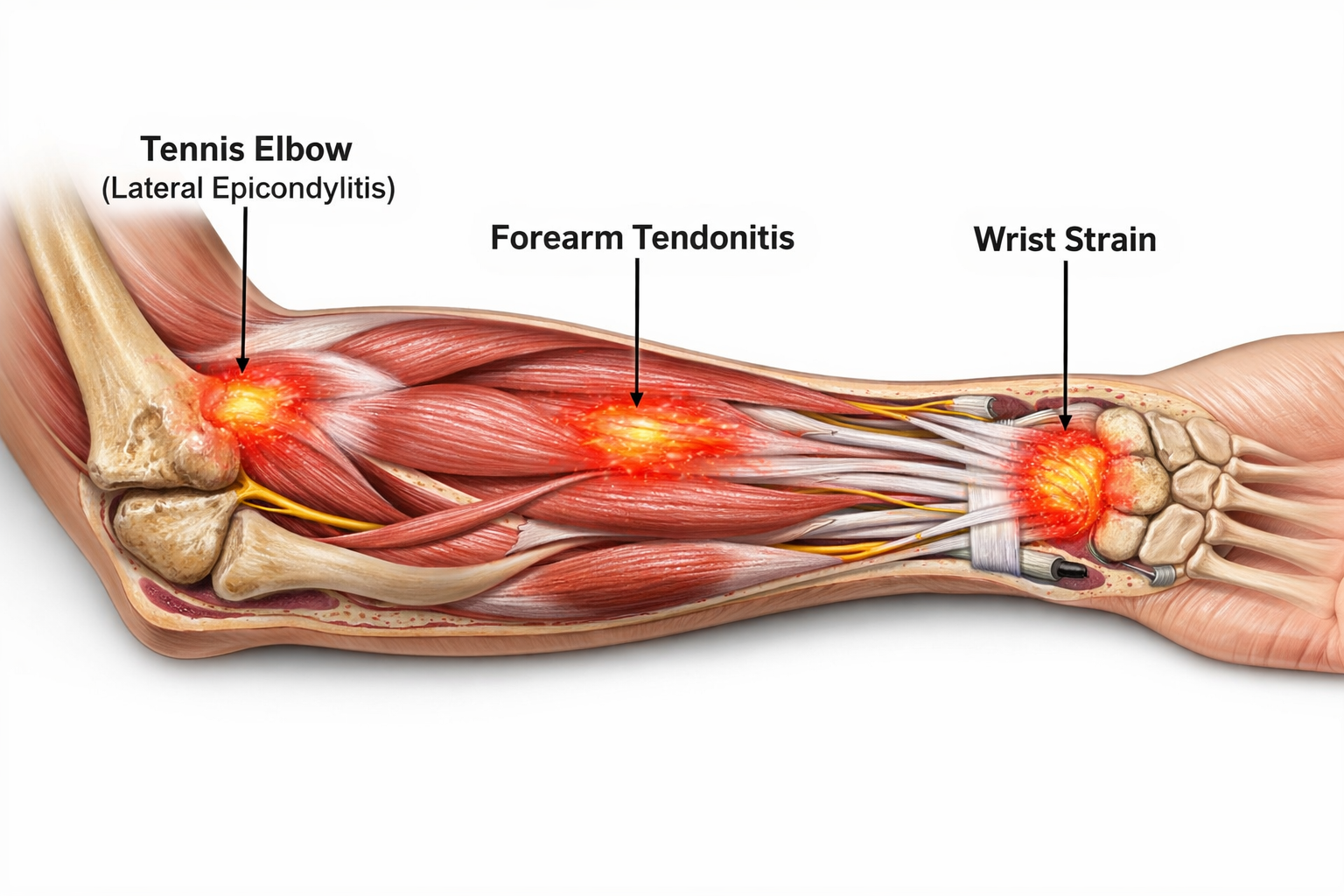
An arm brace for typing pain has become an increasingly popular solution for office workers, writers, and remote professionals seeking relief from repetitive strain injuries. These supportive devices can significantly reduce discomfort when used correctly, but choosing the right type and using proper techniques makes all the difference between relief and wasted money.
This comprehensive guide explores how arm braces work for typing pain, the different types available, and proven strategies to reduce discomfort while maintaining productivity. Whether you’re dealing with early signs of strain or managing chronic pain, understanding your options can help you make informed decisions about your comfort and long-term health.
Key Takeaways
- Typing pain affects 60% of office workers who spend extended hours at computers, often leading to conditions like tendonitis and tennis elbow
- Arm braces provide targeted support by reducing muscle strain and improving circulation during repetitive typing motions
- Three main types of arm braces work best for typing: compression sleeves, elbow straps, and wraparound braces
- Proper ergonomics combined with brace use delivers better results than relying on support devices alone
- Early intervention with appropriate arm support can prevent minor discomfort from developing into chronic conditions
What Causes Typing-Related Arm Pain?
Typing-related arm pain develops gradually through repetitive strain that affects muscles, tendons, and joints in the forearm, elbow, and wrist. Understanding these causes helps explain why an arm brace for typing pain can provide effective relief.
Repetitive Strain from Extended Typing Sessions
The primary culprit behind typing pain is repetitive motion performed thousands of times daily. Every keystroke requires coordinated muscle contractions throughout the arm, from the shoulder down to the fingertips. When these movements repeat continuously without adequate rest, micro-tears develop in muscle fibers and tendons.
Common repetitive strain patterns include:
- Rapid finger movements across the keyboard
- Sustained wrist extension while typing
- Prolonged forearm muscle tension
- Repetitive elbow flexion and extension
Poor Ergonomics Amplify the Problem
Improper workspace setup significantly increases the risk of developing typing pain. Poor ergonomics force the arm into unnatural positions that create additional stress on already overworked muscles and joints.
Key ergonomic factors that contribute to pain:
- Monitor height: Screens positioned too low cause forward head posture and increased arm tension
- Keyboard position: Keyboards placed too high force wrist extension and forearm strain
- Chair height: Improper seating creates awkward arm angles during typing
- Desk setup: Inadequate armrest support increases shoulder and elbow stress
Specific Conditions Linked to Typing Pain
Several medical conditions commonly develop from prolonged typing activities. An arm brace for typing pain can help manage these conditions when used as part of a comprehensive treatment approach.
🔹 Tendonitis
Inflammation of tendons in the forearm and elbow causes pain that worsens with continued typing. The condition develops when tendons become overloaded from repetitive motion without sufficient recovery time.
🔹 Tennis Elbow (Lateral Epicondylitis)
Despite its name, tennis elbow frequently affects office workers who type extensively. Pain occurs on the outside of the elbow and radiates down the forearm, particularly during gripping motions like holding a mouse.
🔹 Carpal Tunnel Syndrome
Compression of the median nerve in the wrist causes numbness, tingling, and pain that can extend up the forearm. While primarily a wrist condition, the discomfort often affects the entire arm.
How Small Daily Habits Create Long-Term Problems
Many people underestimate how minor daily habits accumulate into significant discomfort over time. Small adjustments in typing technique or workspace setup can either prevent problems or contribute to their development.
Problematic daily habits include:
- Taking insufficient breaks between typing sessions
- Maintaining static arm positions for hours
- Ignoring early warning signs of discomfort
- Using excessive force when typing or clicking
- Working in poorly lit environments that increase muscle tension
The good news is that understanding these causes provides a roadmap for effective prevention and treatment. An arm brace for typing pain addresses many of these issues by providing external support that reduces muscle strain and promotes better positioning during work activities.

|
|

|
|
Our Rating:
4.5
|
Our Rating:
4.4
|
Our Rating:
4.9
|
|
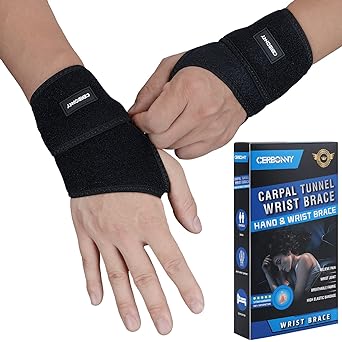
Description: A removable wrist splint and two fixed plastic splints provide a high level of wrist support. Limits unconscious bending or twisting of the wrist during sleep, avoiding aggravation of inflammation or nerve compression due to improper posture |
Description: Wrist bracers can be adjusted according to their comfort level, our wrist band can ensure stability, not easy to fall off, wearing it our hand support is very comfortable. High quality soft breathable fabric, |
Description: Maximum Pain Relief: Our wrist support braces are designed to help you relieve the pain and get the support you need for all-day and all-night comfort. Commonly used by people suffering from carpal tunnel syndrome, tendinitis, arthritis, wrist sprains, strains, etc. |
|
$13.99
|
$15.95
|
$28.49
|
A removable wrist splint and two fixed plastic splints provide a high level of wrist support. Limits unconscious bending or twisting of the wrist during sleep, avoiding aggravation of inflammation or nerve compression due to improper posture
Wrist bracers can be adjusted according to their comfort level, our wrist band can ensure stability, not easy to fall off, wearing it our hand support is very comfortable. High quality soft breathable fabric,
Maximum Pain Relief: Our wrist support braces are designed to help you relieve the pain and get the support you need for all-day and all-night comfort. Commonly used by people suffering from carpal tunnel syndrome, tendinitis, arthritis, wrist sprains, strains, etc.
Can an Arm Brace Help With Typing Pain?
An arm brace for typing pain can provide significant relief when used correctly, but understanding how these devices work helps set realistic expectations for their effectiveness. The science behind arm braces reveals why they’re particularly beneficial for typing-related discomfort.
How Arm Braces Provide Support and Reduce Strain
Arm braces work by redistributing mechanical stress away from overworked muscles and tendons during typing activities. When you type without support, small muscle groups in the forearm work continuously to maintain hand position and execute finger movements. This constant tension leads to fatigue and eventual pain.
Key mechanisms of arm brace support:
- Load distribution: Braces spread forces across a larger surface area, reducing pressure on specific tendons
- Muscle offloading: External support allows overworked muscles to partially relax during typing
- Movement guidance: Braces encourage proper arm positioning and discourage harmful postures
- Fatigue reduction: Supported muscles can work longer with less strain and discomfort
The Role of Compression in Improving Circulation
Compression therapy represents one of the most important benefits of using an arm brace for typing pain. Graduated compression improves blood flow to working muscles, which enhances oxygen delivery and waste product removal.
Circulation benefits include:
- Reduced muscle fatigue through improved oxygen supply
- Faster recovery between typing sessions
- Decreased inflammation in irritated tissues
- Enhanced nutrient delivery to healing tendons
Research shows that mild compression (15-20 mmHg) provides optimal benefits for repetitive strain injuries without restricting normal movement patterns required for typing.
Stabilizing Muscles and Tendons During Repetitive Movement
An effective arm brace for typing pain provides dynamic stabilization that supports natural movement while preventing excessive strain. Unlike rigid immobilization, this approach allows normal typing function while protecting vulnerable structures.
Stabilization benefits:
- Tendon protection: Reduces excessive stretching and micro-tears in overused tendons
- Joint alignment: Maintains proper wrist and elbow positioning during typing
- Muscle coordination: Improves proprioception and movement awareness
- Vibration dampening: Absorbs impact forces from rapid typing motions
Why Braces Are Most Effective When Combined With Ergonomic Changes
While an arm brace for typing pain can provide immediate relief, combining brace use with ergonomic improvements delivers the best long-term results. Braces address symptoms, but ergonomic changes target root causes of typing pain.
Synergistic benefits of combined approaches:
- Braces provide immediate pain relief while ergonomic changes take effect
- Proper workspace setup reduces the workload on supported muscles
- Combined interventions address both symptoms and underlying causes
- Gradual improvement allows for reduced dependence on external support
💡 Pro Tip: Start with an arm brace for immediate relief, then gradually implement ergonomic improvements. As your workspace becomes more supportive, you may find you need the brace less frequently.
The effectiveness of arm braces varies among individuals, but research indicates that 70-80% of people with typing-related arm pain experience meaningful improvement when using appropriate support devices. The key lies in selecting the right type of brace and using it as part of a comprehensive approach to workplace wellness.
Just as selecting the right support is crucial for other joints, choosing appropriate support requires understanding your specific needs and pain patterns.
Types of Arm Braces for Typing Pain
Selecting the right arm brace for typing pain depends on your specific symptoms, pain location, and comfort preferences. Three main categories of arm braces offer different levels of support and target distinct aspects of typing-related discomfort.
Compression Sleeves
Compression sleeves represent the most popular choice for mild to moderate typing pain. These sleeve-style braces provide consistent, gentle pressure along the entire forearm, making them ideal for all-day wear during office work.
Key features of compression sleeves:
- Graduated compression: Tighter at the wrist, gradually loosening toward the elbow
- Breathable materials: Moisture-wicking fabrics prevent overheating during long work sessions
- Full forearm coverage: Supports multiple muscle groups simultaneously
- Discreet appearance: Thin profile fits comfortably under clothing
✅ Best for:
- General forearm fatigue and achiness
- Early-stage repetitive strain injuries
- Prevention during high-volume typing periods
- People who prefer minimal bulk while working
Compression levels typically range from 15-25 mmHg, providing therapeutic benefits without restricting normal typing motions. Many users find compression sleeves comfortable enough to wear throughout entire workdays.
Elbow Straps (Counterforce Braces)
Counterforce braces target specific tendon pain around the elbow, making them particularly effective for tennis elbow and golfer’s elbow conditions common among heavy computer users. These compact braces focus pressure on key trigger points rather than covering the entire forearm.
Design characteristics:
- Targeted pressure pad: Applies focused compression to affected tendons
- Adjustable strap system: Allows precise pressure adjustment throughout the day
- Minimal coverage: Leaves most of the arm free for normal movement
- Quick application: Easy to put on and remove during work breaks
✅ Best for:
- Tennis elbow (lateral epicondylitis) pain
- Golfer’s elbow (medial epicondylitis) symptoms
- Localized tendon inflammation
- People who want targeted relief without full-arm coverage
Proper positioning is crucial for counterforce braces. The pressure pad should sit approximately 2-3 inches below the point of maximum tenderness for optimal pain relief.
Wraparound Arm Braces
Wraparound braces offer the most adjustable option for an arm brace for typing pain, featuring multiple straps and closures that allow customized fit and support levels. These braces work well for people with varying pain levels throughout the day.
Adjustable features include:
- Multiple strap systems: Independent adjustment of compression zones
- Removable padding: Customizable pressure point relief
- Variable coverage: Can be configured for forearm, elbow, or combination support
- Progressive tightening: Ability to increase or decrease support as needed
✅ Best for:
- Moderate to severe typing pain
- People with fluctuating symptoms
- Those who need different support levels throughout the day
- Users who want maximum customization options
Size considerations are particularly important for wraparound braces. Proper fit ensures even pressure distribution and prevents the brace from shifting during typing activities.
Choosing Between Brace Types
Selection criteria for the best arm brace for typing pain include:
| Factor | Compression Sleeve | Elbow Strap | Wraparound Brace |
|---|---|---|---|
| Pain Level | Mild to moderate | Localized/specific | Moderate to severe |
| Coverage | Full forearm | Targeted elbow area | Customizable |
| Adjustability | Limited | Moderate | High |
| Discretion | High | High | Moderate |
| All-day wear | Excellent | Good | Variable |
Material considerations also influence comfort and effectiveness:
- Neoprene: Provides warmth and compression but may retain moisture
- Breathable synthetics: Offer compression with better moisture management
- Cotton blends: Most comfortable but provide less targeted compression
Understanding the principles behind effective joint support, similar to those used in knee brace selection, helps ensure you choose an arm brace that addresses your specific typing pain patterns.
The right arm brace for typing pain should feel supportive without restricting normal movement patterns. If a brace causes numbness, tingling, or increased pain, it may be too tight or incorrectly positioned.
Benefits of Using an Arm Brace While Typing
An arm brace for typing pain provides multiple therapeutic benefits that extend beyond simple pain relief. Understanding these advantages helps explain why many office workers, writers, and remote professionals find braces essential for comfortable, productive work sessions.
Reduces Strain on Muscles and Tendons
The primary benefit of using an arm brace for typing pain lies in mechanical stress reduction on overworked forearm muscles and tendons. During extended typing sessions, small muscle groups work continuously to maintain hand position and execute rapid finger movements. This constant tension leads to microscopic damage and inflammation.
Specific strain reduction mechanisms:
- Load sharing: External support reduces the workload on fatigued muscles by up to 30%
- Tension distribution: Pressure spreads across multiple muscle groups rather than concentrating on specific areas
- Movement efficiency: Supported muscles require less energy to maintain typing positions
- Recovery enhancement: Reduced strain allows faster healing between work sessions
Research findings indicate that office workers using appropriate arm support report 40-60% less muscle fatigue after extended typing sessions compared to working without support.
Helps Prevent Worsening of Repetitive Stress Injuries
Early intervention with an arm brace for typing pain can halt the progression of repetitive stress injuries before they become chronic conditions requiring extensive treatment. Many typing-related injuries develop gradually, making prevention more effective than treatment.
Prevention mechanisms include:
- Micro-trauma reduction: Limiting small daily injuries that accumulate over time
- Inflammation control: Compression helps manage inflammatory responses in irritated tissues
- Movement modification: Braces encourage better typing postures that reduce harmful stress patterns
- Awareness enhancement: Physical reminder to take breaks and adjust positioning
🔹 Early Warning Signs that an arm brace can help prevent from worsening:
- Mild aching after long typing sessions
- Occasional stiffness in the forearm or elbow
- Slight discomfort when gripping objects
- Fatigue that improves with rest
Improves Comfort During Long Typing Sessions
Comfort enhancement represents one of the most immediate benefits users notice when starting to use an arm brace for typing pain. This improved comfort translates directly into better work performance and reduced distraction from physical discomfort.
Comfort improvements include:
- Sustained endurance: Ability to type comfortably for longer periods
- Reduced fidgeting: Less need to frequently adjust arm position or take pain breaks
- Better focus: Decreased distraction from physical discomfort
- Consistent performance: Maintained typing speed and accuracy throughout the workday
Productivity benefits often surprise new users. Studies show that workers using appropriate arm support maintain 15-20% better typing accuracy during the final hours of long work sessions compared to unsupported typing.
Encourages Better Posture and Awareness
An often-overlooked benefit of using an arm brace for typing pain is the postural awareness it creates. The physical presence of the brace serves as a constant reminder to maintain proper positioning and take regular breaks.
Postural improvements include:
- Wrist alignment: Encourages neutral wrist positioning during typing
- Shoulder relaxation: Reduces tendency to hunch shoulders during concentrated work
- Elbow positioning: Promotes proper elbow angles that reduce strain
- Break reminders: Physical awareness encourages regular rest periods
Habit formation occurs naturally when using an arm brace consistently. Users often report developing better typing ergonomics that persist even when not wearing the brace.
Additional Therapeutic Benefits
Secondary benefits of arm brace use extend beyond immediate pain relief:
🔹 Improved Sleep Quality
Reduced daytime strain often leads to better nighttime comfort and fewer pain-related sleep disruptions.
🔹 Enhanced Circulation
Compression features promote better blood flow, supporting tissue healing and reducing inflammation.
🔹 Psychological Confidence
Having supportive equipment reduces anxiety about pain and injury, allowing more relaxed, efficient work.
🔹 Cost-Effective Prevention
Early intervention with an arm brace costs significantly less than treating advanced repetitive strain injuries.
The benefits of using an arm brace for typing pain compound over time. While immediate relief may be modest, consistent use often leads to significant long-term improvements in comfort and function. Similar to how proper support helps with other joint issues, arm braces work best when used consistently as part of a comprehensive approach to workplace wellness.
💡 Success Tip: Track your comfort levels and productivity metrics when starting to use an arm brace. Many users find that documenting improvements helps motivate consistent use and proper technique.
How to Choose the Best Arm Brace for Typing
Selecting the optimal arm brace for typing pain requires careful consideration of your specific symptoms, work environment, and personal preferences. The right choice can provide significant relief, while an inappropriate brace may offer little benefit or even increase discomfort.
Assessing Your Level of Support Needed
Pain severity and location serve as the primary factors in determining appropriate support levels. Different conditions require different approaches, and matching the brace to your specific needs ensures optimal results.
Light Support Indicators:
- Mild aching after extended typing sessions
- Occasional forearm stiffness or fatigue
- Discomfort that resolves with short breaks
- Prevention-focused use during high-volume work periods
Moderate Support Indicators:
- Persistent pain during or after typing
- Localized tenderness around the elbow or forearm
- Difficulty maintaining comfortable typing positions
- Symptoms that interfere with work productivity
Comprehensive Support Indicators:
- Severe pain that limits typing duration
- Multiple symptom locations (elbow, forearm, wrist)
- Chronic conditions like diagnosed tendonitis
- Failed response to lighter support options
Prioritizing Breathability for Long Work Sessions
Material selection significantly impacts comfort during extended wear, particularly for office workers who need all-day support. An arm brace for typing pain should maintain therapeutic benefits without causing overheating or skin irritation.
Breathable material options:
- Moisture-wicking synthetics: Polyester blends that pull sweat away from skin
- Mesh panels: Strategic ventilation zones in high-heat areas
- Bamboo fiber blends: Natural antimicrobial properties with excellent breathability
- Perforated neoprene: Traditional compression material with added ventilation
Climate considerations also influence material choice:
- Hot climates: Prioritize maximum breathability over warmth retention
- Air-conditioned offices: Moderate insulation may provide comfort benefits
- Variable temperatures: Removable layers or adjustable coverage options
Ensuring Proper Fit and Sizing
Accurate measurements are crucial for effective arm brace function. An improperly fitted brace can reduce therapeutic benefits and may cause additional problems like circulation restriction or pressure points.
Key measurement points:
- Forearm circumference: Measure at the widest point, typically 2-3 inches below the elbow
- Elbow circumference: Around the joint with arm slightly bent
- Forearm length: From elbow crease to wrist crease for full-coverage braces
- Dominant vs. non-dominant arm: Sizes may differ between arms
Sizing guidelines for optimal fit:
| Measurement | Compression Sleeve | Elbow Strap | Wraparound Brace |
|---|---|---|---|
| Snug fit | Essential | Moderate | Adjustable |
| Range of motion | Full | Full | Customizable |
| Pressure points | Avoid | Targeted | Controllable |
| Size tolerance | ±0.5 inches | ±1 inch | ±2 inches |
Evaluating Comfort for Extended Wear
All-day wearability distinguishes high-quality arm braces from basic support products. Since typing pain often requires extended support periods, comfort features become essential rather than optional.
Comfort features to evaluate:
- Seamless construction: Reduces chafing and pressure points during movement
- Soft edge binding: Prevents skin irritation at brace margins
- Anatomical contouring: Follows natural arm curves for better fit
- Adjustable compression zones: Allows fine-tuning of pressure distribution
Trial considerations:
- Return policies: Look for manufacturers offering satisfaction guarantees
- Gradual introduction: Start with shorter wearing periods to assess comfort
- Activity testing: Evaluate performance during actual typing tasks
- Skin sensitivity: Monitor for allergic reactions or irritation
Additional Selection Factors
Lifestyle compatibility ensures your arm brace for typing pain integrates seamlessly into your work routine:
🔹 Professional Appearance
- Discreet colors that blend with business attire
- Slim profiles that fit under clothing
- Professional-looking materials and construction
🔹 Maintenance Requirements
- Machine washable materials for easy cleaning
- Quick-drying fabrics for daily use
- Durable construction that withstands regular washing
🔹 Cost Considerations
- Initial investment vs. long-term durability
- Replacement part availability
- Insurance coverage or HSA/FSA eligibility
🔹 Brand Reputation
- Medical device certifications
- User reviews and testimonials
- Healthcare provider recommendations
Understanding the principles of proper joint support, similar to those used in selecting knee braces for pain relief, helps ensure your arm brace choice addresses your specific typing pain patterns effectively.
💡 Expert Tip: Consider purchasing two identical braces if you find one that works well. Having a backup allows for continuous use while washing the primary brace and ensures consistent support if one becomes damaged or worn.
The investment in a quality arm brace for typing pain often pays dividends in improved comfort, productivity, and long-term joint health. Taking time to select the right option based on your specific needs maximizes the likelihood of successful pain management.
How to Wear an Arm Brace While Working
Proper application and positioning of an arm brace for typing pain significantly influences its effectiveness. Even the highest-quality brace provides limited benefits if worn incorrectly, while proper technique can maximize therapeutic effects and ensure comfortable all-day wear.
Proper Positioning on the Forearm or Elbow
Anatomical placement varies depending on the type of arm brace and your specific pain pattern. Understanding correct positioning ensures optimal support for typing-related discomfort.
Compression Sleeve Positioning:
- Upper edge: Should sit 2-3 inches below the elbow crease
- Lower edge: Extends to within 1-2 inches of the wrist
- Seam alignment: If present, seams should run along the outer forearm edge
- Compression gradient: Tightest at the wrist, gradually loosening toward the elbow
Elbow Strap Positioning:
- Pressure pad location: 2-3 inches below the point of maximum tenderness
- Strap angle: Should run perpendicular to the forearm muscles
- Circumferential placement: Wraps completely around the forearm
- Tension distribution: Even pressure without creating pressure points
Wraparound Brace Positioning:
- Primary strap: Covers the area of greatest discomfort
- Secondary straps: Provide additional support above and below the main area
- Overlap zones: Straps should overlap by 1-2 inches for secure fit
- Adjustment points: All closures should be easily accessible during wear
Ensuring a Snug but Not Tight Fit
Proper compression levels provide therapeutic benefits without compromising circulation or causing additional discomfort. An arm brace for typing pain should feel supportive and secure without creating numbness or tingling.
Fit assessment guidelines:
- Finger test: You should be able to slide one finger under the brace edge
- Circulation check: Fingernails should return to normal color within 2 seconds after pressure
- Movement test: Full range of motion should be possible for typing activities
- Comfort duration: No discomfort after 15-20 minutes of initial wear
⚠️ Warning Signs of Excessive Tightness:
- Numbness or tingling in the fingers or hand
- Skin color changes (pale, blue, or red areas)
- Increased pain or throbbing sensations
- Visible indentations that persist after brace removal
Adjustment throughout the day may be necessary as arm swelling naturally fluctuates. Many people find their arms are slightly smaller in the morning and may swell modestly during the day, requiring minor tension adjustments.
Timing: When to Wear During Work vs. Breaks
Strategic timing of arm brace use maximizes benefits while allowing natural muscle function during appropriate periods. The goal is providing support when needed most while avoiding over-dependence on external assistance.
Optimal wearing schedules:
🔹 During Active Typing:
- High-volume typing sessions lasting more than 30 minutes
- Deadline periods requiring extended computer work
- Times when pain typically develops or worsens
- Preventive use during known high-stress work periods
🔹 During Breaks:
- Short breaks (5-10 minutes): Keep brace on to maintain support
- Lunch breaks: Consider removal to allow unrestricted movement
- Movement breaks: May remove for stretching exercises
- End of workday: Remove to allow natural muscle function
🔹 Gradual Reduction Strategy:
As symptoms improve, gradually reduce wearing time to encourage natural muscle strengthening while maintaining pain relief benefits.
Application Techniques for Different Brace Types
Proper donning technique ensures consistent positioning and optimal therapeutic effects each time you use your arm brace for typing pain.
Compression Sleeve Application:
- Preparation: Ensure arm is clean and dry
- Initial positioning: Start with sleeve inside-out at wrist level
- Rolling technique: Gradually roll sleeve up the forearm
- Final adjustment: Smooth out wrinkles and ensure even compression
- Position check: Verify proper anatomical placement
Elbow Strap Application:
- Locate target area: Find the point 2-3 inches below maximum tenderness
- Initial wrap: Place pressure pad over target area
- Secure fastening: Wrap strap snugly but not tightly around forearm
- Pressure adjustment: Fine-tune compression using adjustment mechanisms
- Function test: Perform gentle typing motions to verify comfort
Wraparound Brace Application:
- Primary strap first: Secure the main support strap over the pain area
- Secondary straps: Apply additional straps working outward from the primary area
- Tension balancing: Adjust all straps to create even support distribution
- Final positioning: Ensure no gaps or pressure points exist
- Mobility check: Verify full typing range of motion
Maintenance and Care During Use
Proper maintenance extends brace life and ensures consistent therapeutic benefits throughout extended use periods.
Daily care routines:
- Skin inspection: Check for irritation or pressure marks
- Brace cleaning: Wipe down with antimicrobial cloths if needed
- Adjustment monitoring: Note any changes in fit or comfort
- Wear tracking: Monitor total daily wearing time
Weekly maintenance:
- Thorough cleaning: Follow manufacturer washing instructions
- Strap inspection: Check for wear or loosening of adjustment mechanisms
- Fit reassessment: Verify sizing remains appropriate as symptoms change
Understanding proper application techniques, similar to those used for other supportive devices, ensures your arm brace provides maximum benefit for typing pain relief.
💡 Pro Tip: Take photos of proper brace positioning when you first achieve optimal comfort and pain relief. These reference images help ensure consistent application, especially when trying the brace after periods of non-use.
Consistent, proper use of an arm brace for typing pain, combined with appropriate timing and maintenance, creates the foundation for effective long-term pain management and improved work comfort.
Additional Ways to Reduce Typing Pain
While an arm brace for typing pain provides valuable support, combining it with comprehensive ergonomic improvements and healthy work habits creates the most effective approach to long-term pain relief. These additional strategies address root causes rather than just managing symptoms.
Adjusting Desk Ergonomics
Proper workspace setup forms the foundation of typing pain prevention. Even the best arm brace cannot fully compensate for poor ergonomics that force the body into harmful positions throughout the workday.
Monitor positioning guidelines:
- Height: Top of screen at or slightly below eye level
- Distance: 20-26 inches from eyes to screen
- Angle: Screen tilted back 10-20 degrees
- Lighting: Positioned to minimize glare and eye strain
Keyboard and mouse setup:
- Keyboard height: Elbows at 90-degree angles when typing
- Wrist position: Neutral alignment, not bent up or down
- Mouse proximity: Close enough to avoid reaching or stretching
- Surface support: Adequate space for forearm rest
Chair and desk configuration:
- Seat height: Feet flat on floor with thighs parallel to ground
- Backrest: Supports natural lumbar curve
- Armrests: Support forearms without lifting shoulders
- Desk height: Allows relaxed shoulder position while typing
💡 Quick Setup Check: Your arms should hang naturally at your sides with elbows at 90 degrees when hands rest on the keyboard. If you need to reach up or down significantly, adjust your setup.
Taking Regular Breaks
Micro-breaks and movement provide essential recovery time for muscles and tendons stressed by repetitive typing motions. An arm brace for typing pain works more effectively when combined with strategic rest periods.
Effective break strategies:
- 20-20-20 rule: Every 20 minutes, look at something 20 feet away for 20 seconds
- Micro-breaks: 30-second movement breaks every 10 minutes
- Hourly breaks: 5-10 minute breaks for stretching and movement
- Lunch breaks: Complete break from typing activities
Break activities that complement arm brace use:
- Gentle stretching: Focus on forearms, wrists, and shoulders
- Hand exercises: Finger extensions and gentle rotations
- Posture resets: Stand, walk, and adjust positioning
- Relaxation techniques: Brief meditation or breathing exercises
Technology aids for break reminders:
- Software applications: Programs that enforce break schedules
- Smartphone apps: Customizable reminder systems
- Wearable devices: Activity trackers with movement prompts
- Desktop timers: Visual cues for break timing
Stretching and Strengthening Exercises
Targeted exercises address muscle imbalances and weakness patterns that contribute to typing pain. These activities work synergistically with an arm brace for typing pain to improve long-term function.
Essential stretching exercises:
🔹 Wrist Flexor Stretch
- Extend arm forward with palm up
- Use other hand to gently pull fingers back
- Hold 15-30 seconds, repeat 3 times
🔹 Wrist Extensor Stretch
- Extend arm forward with palm down
- Use other hand to gently push hand downward
- Hold 15-30 seconds, repeat 3 times
🔹 Forearm Stretch
- Place palms together in prayer position
- Lower hands while keeping palms together
- Hold when stretch is felt in forearms
Strengthening exercises for typing endurance:
🔹 Grip Strengthening
- Squeeze stress ball or therapy putty
- Hold 5 seconds, repeat 10 times
- Perform 2-3 times daily
🔹 Finger Extensions
- Place rubber band around fingertips
- Spread fingers against resistance
- Hold 5 seconds, repeat 10 times
🔹 Wrist Curls
- Hold light weight (1-2 pounds)
- Perform slow wrist flexion and extension
- 10-15 repetitions, 2-3 sets
Using Ergonomic Keyboards and Wrist Supports
Ergonomic equipment complements an arm brace for typing pain by reducing the mechanical stress that causes discomfort in the first place. The right tools can significantly decrease the workload on supported muscles.
Ergonomic keyboard options:
- Split keyboards: Reduce ulnar deviation and forearm rotation
- Curved keyboards: Follow natural hand positioning
- Adjustable keyboards: Allow customization of angle and height
- Mechanical keyboards: Reduce force required for key activation
Wrist support considerations:
- Gel pads: Provide soft support during typing breaks
- Memory foam rests: Conform to individual wrist contours
- Adjustable supports: Match keyboard height and angle
- Integrated solutions: Built-in support on ergonomic keyboards
Mouse alternatives:
- Vertical mice: Reduce forearm rotation
- Trackball devices: Minimize wrist movement
- Touchpad solutions: Eliminate repetitive clicking motions
- Voice recognition software: Reduce overall typing volume
Environmental Factors
Workplace environment influences muscle tension and comfort levels throughout the day. Optimizing these factors enhances the effectiveness of an arm brace for typing pain.
Lighting optimization:
- Natural light: Position desk to minimize glare
- Task lighting: Adequate illumination for keyboard visibility
- Screen brightness: Match ambient lighting levels
- Blue light filters: Reduce eye strain during extended use
Temperature and humidity control:
- Comfortable temperature: 68-72°F for optimal muscle function
- Adequate humidity: 40-60% to prevent skin irritation under braces
- Air circulation: Prevent stuffiness that increases muscle tension
- Personal comfort: Layers allow individual temperature adjustment
The combination of an arm brace for typing pain with comprehensive ergonomic improvements creates a powerful approach to long-term comfort and productivity. Similar to how proper support works best with appropriate activity modifications, arm braces achieve optimal results when used as part of a complete wellness strategy.
💡 Implementation Tip: Introduce changes gradually rather than attempting to modify everything at once. Start with the most impactful adjustments (monitor height, break schedule) while using your arm brace, then add additional improvements over time.
Common Mistakes to Avoid
Understanding frequent errors in arm brace for typing pain use helps ensure you get maximum benefit from your investment while avoiding potential complications. These mistakes can reduce effectiveness or even worsen symptoms if not corrected promptly.
Wearing a Brace Too Tightly
Excessive compression represents the most common mistake among new arm brace users. The misconception that “tighter equals better support” can lead to circulation problems and increased discomfort rather than pain relief.
Signs of over-tightening:
- Numbness or tingling in fingers or hand
- Skin color changes (pale, blue, or red areas)
- Throbbing or pulsing sensations in the arm
- Increased pain rather than relief
- Visible indentations that persist after brace removal
Proper tightness guidelines:
- You should be able to slide one finger under the brace edge
- No restriction of normal blood flow or nerve function
- Supportive feeling without pressure or discomfort
- Ability to wear comfortably for extended periods
Adjustment strategies:
- Start loose: Begin with minimal compression and gradually increase if needed
- Monitor regularly: Check fit multiple times during initial use
- Reassess daily: Arm size fluctuates throughout the day
- Professional guidance: Consult healthcare providers if unsure about proper fit
Relying Only on the Brace Without Fixing Ergonomics
Brace dependency without addressing underlying causes provides only temporary relief and may allow problems to worsen over time. An arm brace for typing pain works best as part of a comprehensive approach.
Problems with brace-only solutions:
- Symptom masking: Pain relief without addressing root causes
- Muscle weakening: Over-reliance on external support
- Continued damage: Ongoing harmful stress patterns
- Limited improvement: Plateau in pain relief and function
Comprehensive approach benefits:
- Root cause correction: Ergonomic improvements address underlying problems
- Progressive improvement: Gradual reduction in brace dependency
- Long-term solutions: Sustainable comfort without external aids
- Enhanced effectiveness: Brace works better with proper ergonomics
Implementation strategy:
- Use arm brace for immediate relief while implementing ergonomic changes
- Gradually reduce brace dependency as workspace improves
- Focus on habit formation and postural awareness
- Monitor progress and adjust approach as needed
Ignoring Early Signs of Discomfort
Early intervention with an arm brace for typing pain can prevent minor issues from becoming chronic conditions requiring extensive treatment. Many people dismiss initial symptoms until they significantly impact work performance.
Early warning signs often ignored:
- Mild aching after long typing sessions
- Occasional stiffness in the morning
- Slight discomfort when gripping objects
- Fatigue that improves with rest but returns with activity
Consequences of delayed intervention:
- Progressive worsening of symptoms over time
- Development of chronic conditions like tendonitis
- Increased treatment complexity and duration
- Greater impact on work productivity and quality of life
Proactive response strategies:
- Start arm brace use at first signs of discomfort
- Implement ergonomic improvements immediately
- Modify work habits to reduce strain
- Seek professional evaluation if symptoms persist
Choosing the Wrong Type of Brace
Mismatched support occurs when the brace type doesn’t align with specific pain patterns or functional needs. This mismatch can limit effectiveness and may cause frustration with the treatment approach.
Common mismatching scenarios:
- Compression sleeve for localized elbow pain: May not provide targeted relief
- Elbow strap for general forearm fatigue: Insufficient coverage area
- Heavy brace for mild symptoms: Unnecessary restriction and bulk
- Light support for severe conditions: Inadequate therapeutic effect
Selection improvement strategies:
- Accurate symptom assessment: Identify specific pain locations and triggers
- Professional consultation: Get expert guidance on appropriate brace types
- Trial periods: Test different options to find optimal match
- Gradual progression: Start with lighter support and increase if needed
Poor Timing and Duration of Use
Inappropriate wearing schedules can reduce therapeutic benefits and may contribute to muscle weakness or over-dependence on external support.
Timing mistakes:
- All-day wear without breaks: May cause skin irritation or muscle atrophy
- Only wearing during pain episodes: Misses prevention opportunities
- Inconsistent use patterns: Reduces cumulative therapeutic benefits
- Wearing during inappropriate activities: May interfere with necessary movement
Optimal timing strategies:
- Preventive use: Wear during high-risk typing periods
- Consistent schedule: Regular use patterns for best results
- Appropriate breaks: Remove periodically for skin health and muscle function
- Activity-specific application: Match brace use to typing demands
Neglecting Proper Care and Maintenance
Poor maintenance can reduce brace effectiveness, create hygiene issues, and shorten device lifespan, ultimately compromising the investment in pain relief.
Maintenance oversights:
- Infrequent cleaning: Bacterial buildup and odor development
- Improper washing: Damage to therapeutic materials
- Ignoring wear patterns: Continued use of ineffective worn braces
- Poor storage: Damage from improper handling when not in use
Proper care protocols:
- Daily cleaning: Wipe down with antimicrobial cloths
- Regular washing: Follow manufacturer instructions for deep cleaning
- Inspection routine: Check for wear, damage, or loss of elasticity
- Proper storage: Keep in clean, dry location when not in use
Understanding these common mistakes helps ensure your arm brace for typing pain provides optimal benefits while avoiding potential complications. Similar to how proper use is essential for other supportive devices, arm braces require thoughtful application and care for best results.
💡 Success Strategy: Keep a brief log of your brace use, including comfort levels, timing, and any issues. This record helps identify patterns and optimize your approach for maximum benefit.
When to Seek Medical Advice
While an arm brace for typing pain can provide significant relief for many people, certain symptoms indicate the need for professional medical evaluation. Recognizing these warning signs ensures appropriate treatment and prevents minor issues from developing into serious conditions.
Persistent or Worsening Pain
Progressive symptoms that don’t improve with conservative measures, including proper arm brace use, may indicate underlying conditions requiring medical intervention. Pain that continues to worsen despite appropriate self-care suggests the need for professional assessment.
Red flag symptoms requiring medical attention:
- Pain intensity increase despite using an arm brace for typing pain consistently
- Symptoms lasting longer than 2-3 weeks without improvement
- Pain that interferes with sleep or daily activities outside of work
- Discomfort that doesn’t respond to rest, ergonomic changes, and supportive devices
Documentation for medical visits:
- Pain patterns: When pain occurs, intensity levels, and triggering activities
- Treatment attempts: Types of arm braces tried, ergonomic changes made
- Work demands: Daily typing volume, deadline pressures, and break schedules
- Symptom progression: How symptoms have changed over time
Professional evaluation benefits:
- Accurate diagnosis: Identification of specific conditions causing pain
- Targeted treatment: Customized therapy approaches beyond basic support
- Prescription options: Access to medical-grade braces and treatments
- Prevention strategies: Professional guidance on avoiding recurrence
Numbness or Tingling in the Arm or Hand
Neurological symptoms such as numbness, tingling, or burning sensations may indicate nerve compression or irritation that requires prompt medical evaluation. These symptoms can signal conditions like carpal tunnel syndrome or cubital tunnel syndrome.
Concerning neurological signs:
- Numbness in specific finger patterns (thumb, index, middle fingers suggest carpal tunnel)
- Tingling that worsens at night or upon waking
- Burning sensations along the forearm or into the hand
- Electric shock-like feelings during typing or gripping activities
Immediate medical attention needed for:
- Sudden onset of severe numbness or tingling
- Complete loss of sensation in any area of the hand or fingers
- Weakness accompanying numbness that affects grip strength
- Symptoms in both arms simultaneously without clear cause
Diagnostic procedures may include:
- Nerve conduction studies: Measure electrical activity in nerves
- Electromyography (EMG): Assess muscle and nerve function
- Imaging studies: X-rays, MRI, or ultrasound to evaluate structures
- Physical examination: Specific tests for nerve compression syndromes
Difficulty Performing Everyday Tasks
Functional limitations that extend beyond typing activities indicate significant impairment requiring professional intervention. When an arm brace for typing pain doesn’t restore normal function, medical evaluation becomes essential.
Daily activity limitations warranting medical care:
- Difficulty gripping objects like coffee cups, door handles, or tools
- Problems with fine motor tasks such as writing, buttoning clothes, or using utensils
- Weakness affecting lifting or carrying everyday items
- Pain interfering with personal care activities like brushing teeth or hair
Work-related functional concerns:
- Decreased typing speed or accuracy despite using appropriate support
- Inability to meet work demands due to pain or discomfort
- Frequent breaks required that impact productivity significantly
- Consideration of job modifications or time off due to symptoms
Quality of life impacts:
- Sleep disruption from pain or positioning difficulties
- Recreational activity limitations affecting hobbies or exercise
- Social impact from avoiding activities due to discomfort
- Emotional effects including frustration, anxiety, or depression related to symptoms
Additional Medical Consultation Triggers
Specific circumstances that warrant professional evaluation even if symptoms seem manageable:
🔹 Previous Injury History
- Prior arm, elbow, or wrist injuries that may be contributing to current symptoms
- Previous surgery in the affected area
- History of repetitive strain injuries
🔹 Systemic Conditions
- Diabetes, which can affect nerve function
- Rheumatoid arthritis or other inflammatory conditions
- Thyroid disorders that may contribute to nerve compression
🔹 Medication Effects
- Symptoms that began after starting new medications
- Side effects that may be contributing to arm pain or weakness
- Interactions between medications and current symptoms
🔹 Workplace Factors
- Inability to modify work environment adequately
- Employer requirements for medical documentation
- Workers’ compensation considerations
Preparing for Medical Appointments
Effective preparation ensures productive medical consultations and appropriate treatment recommendations:
Information to gather:
- Symptom timeline: When problems started and how they’ve progressed
- Treatment history: What approaches have been tried, including specific arm brace types
- Work environment details: Photos of workspace setup, job demands, and daily activities
- Pain documentation: Diary of pain levels, timing, and triggering activities
Questions to ask healthcare providers:
- What specific condition is causing my symptoms?
- How can I modify my arm brace use for better results?
- What additional treatments might help?
- How long should recovery take with appropriate treatment?
- What warning signs should prompt immediate follow-up?
Understanding when professional help is needed ensures that an arm brace for typing pain remains an effective tool rather than a temporary mask for serious underlying conditions. Similar to how proper medical guidance helps with other joint issues, arm pain often benefits from professional evaluation when conservative measures aren’t sufficient.
💡 Important Note: Don’t delay seeking medical attention if you’re concerned about your symptoms. Early professional intervention often leads to better outcomes and may prevent the need for more extensive treatment later.
Conclusion
An arm brace for typing pain can provide significant relief for the millions of office workers, writers, and remote professionals experiencing discomfort from repetitive computer use. However, success depends on choosing the right type of brace, using it properly, and combining it with comprehensive ergonomic improvements.
The evidence clearly shows that compression sleeves work best for general forearm fatigue, elbow straps target specific tendon pain, and wraparound braces offer maximum adjustability for varying symptoms. Proper fit and timing are crucial—the brace should feel supportive without restricting circulation, and strategic use during high-demand typing periods provides better results than constant wear.
Key success factors include:
- Early intervention at the first signs of discomfort
- Proper ergonomic setup addressing monitor height, keyboard position, and chair alignment
- Regular breaks and stretching to complement the support provided by the brace
- Professional consultation when symptoms persist or worsen despite appropriate self-care
Remember that an arm brace for typing pain works best as part of a comprehensive approach rather than a standalone solution. The combination of external support, improved workspace ergonomics, and healthy work habits creates the foundation for long-term comfort and productivity.
Take action today by assessing your current typing setup, identifying areas for improvement, and considering whether an arm brace might benefit your specific situation. Small changes implemented consistently often yield significant improvements in comfort and work performance. If symptoms persist despite these efforts, don’t hesitate to seek professional medical evaluation to ensure you’re addressing any underlying conditions appropriately.
Your long-term comfort and career productivity are worth the investment in proper support and ergonomic improvements. Start with one or two changes and build from there—your arms will thank you for the attention and care.