

Remote workers spend an average of 8.7 hours daily at their computers, yet 78% report experiencing arm and wrist pain within their first year of working from home. This surge in repetitive strain injuries has made finding the right arm brace for working from home a critical concern for millions of professionals seeking comfort and sustained productivity.
The shift to remote work has fundamentally changed how people interact with technology. Without proper ergonomic setups or regular movement breaks, the arms, wrists, and elbows bear the brunt of extended computer use. An arm brace for working from home can provide essential support, reduce strain, and help maintain comfort during long work sessions.
This comprehensive guide explores how arm braces can transform the remote work experience, covering everything from understanding common pain causes to selecting the perfect brace for daily computer tasks.
Key Takeaways
• Extended computer use without proper support leads to repetitive strain injuries affecting 78% of remote workers
• Arm braces provide targeted support during typing and mouse work, reducing muscle fatigue and joint stress
• Different brace types serve specific needs – compression sleeves for all-day comfort, elbow straps for localized pain
• Proper ergonomics combined with brace support delivers the best results for long-term arm health
• Professional consultation is recommended for persistent pain or numbness that interferes with work performance
Why Arm Pain Is Common When Working From Home

The transition to remote work has created a perfect storm for arm-related discomfort. Extended typing and mouse use without adequate breaks puts tremendous strain on the forearm muscles and tendons. Most home offices lack the ergonomic equipment found in traditional workplaces, forcing workers to adapt to suboptimal setups.
Poor desk setup or posture compounds these issues significantly. Kitchen tables, couches, and makeshift workstations rarely provide proper arm support or positioning. This leads to awkward wrist angles, elevated shoulders, and constant muscle tension throughout the workday.
The lack of movement and breaks that naturally occur in office environments further exacerbates arm strain. Remote workers often skip the brief respites that come from walking to meetings, chatting with colleagues, or moving between workstations. This continuous computer use creates sustained stress on the same muscle groups.
Repetitive strain from daily tasks affects multiple areas simultaneously. The constant clicking, scrolling, and typing motions create micro-trauma in soft tissues that accumulates over time without proper recovery periods.
Common Work-From-Home Arm Issues
Repetitive Strain Injury (RSI) represents the most widespread concern among remote workers. This umbrella term covers various conditions caused by repeated motions and sustained postures. Symptoms typically include aching, stiffness, and reduced strength in the affected areas.
Tendonitis frequently develops in the forearm tendons responsible for wrist and finger movement. The inflammation creates pain that worsens with continued computer use and may persist even during rest periods.
Elbow pain, particularly tennis elbow (lateral epicondylitis), affects workers who maintain poor arm positioning while using a mouse or typing. The condition creates sharp pain on the outer elbow that radiates down the forearm.
These conditions often develop gradually, making early intervention crucial for preventing more serious complications that could impact long-term work capacity.
|

|

|
|
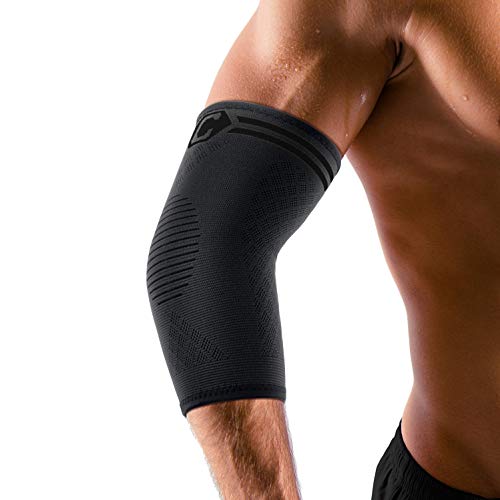
Description: TARGETED PAIN RELIEF & BOOSTED RECOVERY - Engineered with graduated compression, our elbow sleeves apply targeted support to key joint areas to help relieve discomfort associated with tennis elbow, tendonitis, and arthritis. |
Description: GOOD PERFORMANCE - The elbow brace applies even pressure to the elbow joint and elbow muscles, which can relieve tennis elbow, tendonitis, joint inflammation, golfer's elbow and other elbow pains, etc. |
Description: Our elbow brace is great for treating tendonitis, arthritis, sprained bones, strained ligaments, cubital Tunnel,ulnar nerve. Provides optimal support and compression to the elbow joint, reducing pain and preventing further injury during activities |
|
Our Rating:
4.8
|
Our Rating:
4.5
|
Our Rating:
4.4
|
|
$8.49
|
$11.99
|
$7.97
|
TARGETED PAIN RELIEF & BOOSTED RECOVERY - Engineered with graduated compression, our elbow sleeves apply targeted support to key joint areas to help relieve discomfort associated with tennis elbow, tendonitis, and arthritis.
GOOD PERFORMANCE - The elbow brace applies even pressure to the elbow joint and elbow muscles, which can relieve tennis elbow, tendonitis, joint inflammation, golfer's elbow and other elbow pains, etc.
Our elbow brace is great for treating tendonitis, arthritis, sprained bones, strained ligaments, cubital Tunnel,ulnar nerve. Provides optimal support and compression to the elbow joint, reducing pain and preventing further injury during activities
Can an Arm Brace Help While Working From Home?
An arm brace for working from home offers multiple benefits that directly address the challenges of extended computer use. Support during long typing sessions helps maintain proper joint alignment and reduces the workload on fatigued muscles. This external support system allows workers to maintain productivity without constantly fighting discomfort.
The brace reduces strain on muscles and tendons by providing compression and stability to overworked areas. This mechanical assistance helps prevent the micro-trauma that accumulates during repetitive motions, giving soft tissues a chance to recover between work sessions.
Better arm positioning becomes easier to maintain with brace support. The gentle pressure and stability cues help workers become more aware of their posture and naturally adopt healthier positions throughout the day.
Improved comfort and endurance throughout extended work periods represents perhaps the most immediate benefit. Workers often report being able to focus on tasks rather than managing discomfort, leading to both better work quality and reduced fatigue.
For those dealing with repetitive motion pain, an arm brace can provide the targeted support needed to continue working while allowing healing to occur.
Types of Arm Braces for Remote Work
Compression Sleeves
Lightweight and breathable compression sleeves offer the most versatile option for remote workers. These seamless garments provide gentle, consistent pressure that improves circulation and reduces muscle fatigue without restricting movement.
Ideal for all-day desk work, compression sleeves can be worn comfortably under clothing and provide continuous support during extended computer sessions. The graduated compression helps prevent swelling and maintains muscle warmth throughout the workday.
Elbow Straps
Target localized strain from repetitive mouse and keyboard motions with focused pressure on specific trigger points. These compact braces wrap around the forearm just below the elbow, providing relief for tennis elbow and similar conditions.
Useful for specific pain points, elbow straps work by redistributing forces away from inflamed tendons while allowing full range of motion for typing and mouse work. Many remote workers find these particularly effective for addressing isolated areas of discomfort.
Wraparound Arm Braces
Adjustable support for moderate discomfort makes wraparound braces ideal for workers with varying pain levels throughout the day. The customizable compression allows for tighter support during intensive work periods and lighter pressure during breaks.
Good for extended work sessions, these braces typically feature breathable materials and ergonomic designs that accommodate prolonged wear without causing skin irritation or circulation issues.
Flexible Support Braces
Balance between comfort and stability characterizes flexible support braces that combine compression with strategic reinforcement panels. These hybrid designs provide targeted support while maintaining the comfort needed for all-day wear.
Suitable for daily remote work, flexible braces adapt to natural arm movements while providing consistent support during typing, mouse work, and other computer tasks. The versatility makes them excellent choices for workers with varied daily activities.
Workers experiencing arm fatigue may find that flexible support braces offer the ideal combination of comfort and therapeutic benefit for sustained computer use.
What to Look for in the Best Arm Brace for Working From Home
Comfortable for long hours should be the primary consideration when selecting an arm brace for working from home. The brace will likely be worn for 6-8 hours daily, so comfort features like padded edges, seamless construction, and ergonomic shaping become essential for sustained use.
Breathable and moisture-wicking materials prevent the skin irritation and odor issues that can develop during extended wear. Look for fabrics that allow air circulation while maintaining compression and support properties throughout long work sessions.
Lightweight and flexible design ensures the brace won’t interfere with natural typing motions or cause fatigue from the additional weight. The best options provide support without feeling bulky or restrictive during detailed computer work.
Secure fit that doesn’t slip prevents the frustration of constantly readjusting the brace during work. Quality closures, proper sizing, and well-designed compression zones keep the brace in optimal position throughout the day.
Easy to wear and adjust becomes crucial for workers who may need to modify compression levels or remove the brace for breaks. Simple, intuitive adjustment systems allow for quick changes without interrupting workflow.
How to Choose the Right Arm Brace for Remote Work
Match brace type to work habits by considering the specific activities causing discomfort. Heavy mouse users may benefit from elbow straps, while extensive typists might prefer full forearm compression sleeves that support the entire kinetic chain.
Consider wearing duration when evaluating different options. Workers planning to wear the brace for full 8-hour days need maximum comfort features, while those using intermittent support can prioritize therapeutic benefits over extended comfort.
Prioritize comfort and mobility to ensure the brace enhances rather than hinders work performance. The ideal choice provides noticeable support without creating new sources of discomfort or movement restrictions.
Ensure proper sizing and fit by carefully measuring the affected area and consulting manufacturer sizing charts. An incorrectly sized brace can create pressure points, reduce effectiveness, or cause circulation issues during extended wear.
For comprehensive guidance on selecting supportive equipment for computer work, explore options for the best arm brace for work environments.
How to Wear an Arm Brace While Working
Position correctly on the forearm or elbow according to the specific brace design and target area. Most compression sleeves extend from just above the wrist to mid-forearm, while elbow straps sit approximately 2-3 inches below the elbow joint.
Keep it snug but not tight to provide therapeutic compression without restricting circulation. The brace should feel supportive and secure without causing numbness, tingling, or skin color changes that indicate excessive pressure.
Wear during typing or repetitive tasks when arm strain is highest, but consider removing the brace during breaks to allow skin to breathe and circulation to normalize. This cycling approach can extend comfortable wearing time.
Adjust as needed throughout the day based on activity levels and comfort. Many workers find they need slightly different compression levels for different tasks or times of day as muscle fatigue accumulates.
Best Work-From-Home Setup to Reduce Arm Pain
Keep wrists and elbows in neutral position by ensuring the keyboard and mouse are at proper heights relative to elbow level. Wrists should remain straight rather than bent up or down during typing and mouse use.
Adjust chair and desk height so arms can hang naturally at the sides with elbows bent at approximately 90 degrees when hands reach the keyboard. This positioning minimizes strain on shoulder and forearm muscles.
Use ergonomic keyboard and mouse placement with devices positioned close enough to avoid reaching. The mouse should sit at the same level as the keyboard, and both should be directly in front of the user’s body.
Maintain proper posture with feet flat on the floor, back supported, and shoulders relaxed. Good overall posture creates the foundation for healthy arm positioning and reduces compensatory strain patterns.
Similar principles apply to other repetitive activities – writers can benefit from specific ergonomic strategies to prevent arm strain during extended writing sessions.
Additional Tips for Preventing Arm Pain
Take regular breaks every 30-60 minutes to interrupt repetitive motion patterns and allow muscles to recover. Even 1-2 minute breaks can significantly reduce accumulated strain throughout the workday.
Stretch arms and shoulders with gentle movements that counteract the forward posture and repetitive motions of computer work. Focus on extending the wrists, rolling the shoulders, and opening the chest area.
Alternate tasks when possible to vary the demands placed on arm muscles and joints. Switching between typing-heavy and mouse-intensive activities provides natural recovery periods for different muscle groups.
Stay active throughout the day with movement that promotes circulation and prevents stiffness. Simple exercises like arm circles, shoulder blade squeezes, and gentle neck rotations can be performed at the desk.
Common Mistakes to Avoid
Working long hours without breaks represents the most damaging pattern for arm health. Continuous computer use without recovery periods creates cumulative stress that overwhelms the body’s natural healing capacity.
Wearing the brace too tightly can create new problems including reduced circulation, nerve compression, and skin irritation. The goal is supportive compression, not restrictive binding that interferes with normal function.
Ignoring discomfort signals often leads to more serious conditions that require extended recovery periods. Early intervention with proper support and ergonomic adjustments prevents minor issues from becoming major problems.
Relying only on a brace without improving ergonomics addresses symptoms rather than underlying causes. The most effective approach combines supportive devices with proper workspace setup and healthy work habits.
For those dealing with specific conditions like burning nerve pain, addressing both symptoms and root causes becomes even more critical for long-term relief.
When to Seek Medical Advice
Persistent or worsening pain that continues despite rest, proper ergonomics, and supportive devices may indicate a more serious condition requiring professional evaluation and treatment.
Numbness or tingling in the hands, fingers, or arms suggests possible nerve involvement that needs medical assessment. These symptoms can indicate conditions like carpal tunnel syndrome or thoracic outlet syndrome.
Reduced strength or mobility that interferes with normal daily activities warrants prompt medical attention. Progressive weakness may signal nerve damage or other complications requiring specific treatment.
Pain interfering with work performance creates both health and professional concerns that benefit from medical guidance. Healthcare providers can recommend specific treatments, exercises, or workplace modifications.
Frequently Asked Questions
Do arm braces help with desk work pain?
Yes, arm braces can significantly help with desk work pain by providing support to overworked muscles and joints. They reduce strain during repetitive motions and help maintain better positioning throughout long work sessions. The key is choosing the right type of brace for specific symptoms and wearing it properly.
Can you wear an arm brace while typing?
Absolutely. Modern arm braces are designed specifically for computer work and allow full typing functionality. Compression sleeves and flexible support braces work particularly well for typing, as they provide support without restricting finger or wrist movement.
What type of brace is best for remote work?
Compression sleeves typically work best for remote work due to their comfort during extended wear and versatility for different computer tasks. However, workers with specific conditions like tennis elbow may benefit more from targeted elbow straps or wraparound braces.
How tight should an arm brace be?
An arm brace should feel snug and supportive without causing numbness, tingling, or skin color changes. You should be able to slide one finger under the brace comfortably. If the brace leaves deep marks on the skin or causes any circulation issues, it’s too tight.
For workers considering long-term use of arm braces, understanding proper fit becomes especially important for preventing complications.
Conclusion
An arm brace for working from home can be a game-changing solution for remote workers struggling with arm pain and discomfort. By providing targeted support during extended computer use, these devices help reduce strain, improve positioning, and maintain comfort throughout long work sessions.
The most effective approach combines the right brace selection with proper ergonomics, regular breaks, and healthy work habits. Whether dealing with early-stage discomfort or managing established conditions, an arm brace can help maintain productivity while supporting the healing process.
Take action today by assessing your current work setup, identifying areas of discomfort, and selecting an appropriate arm brace for your specific needs. Start with proper measurements and consider your daily work patterns when choosing between compression sleeves, elbow straps, or flexible support options.
Remember that persistent or worsening symptoms warrant professional medical evaluation. An arm brace should enhance your work experience, not serve as a long-term substitute for addressing underlying ergonomic issues or medical conditions.
Small changes make a significant difference in long-term arm health and work satisfaction. Investing in proper support today can prevent more serious problems tomorrow while maintaining the comfort and productivity essential for successful remote work.